Wings
danger
Do not use the script if the wings are already installed as it may wipe critical files.
Picking a Server OS
| Operating System | Version | Supported |
|---|---|---|
| Ubuntu | 20.04 | ✅ |
| Ubuntu | 22.04 | ✅ |
| 24.04 | ✅ | |
| Debian | 10 | ✅ |
| 11 | ✅ | |
| 12 | ✅ | |
| 13 | ✅ | |
| Rocky Linux | 8 | ✅ |
| 9 | ✅ | |
| AlmaLinux | 8 | ✅ |
| 9 | ✅ |
Installation
warning
You MUST be in sudo for the commands to work.
sudo su
Run the following command in the SUDO terminal
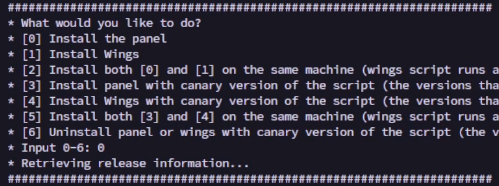
bash <(curl -s https://pterodactyl-installer.se)
Type number 0 for the panel installation
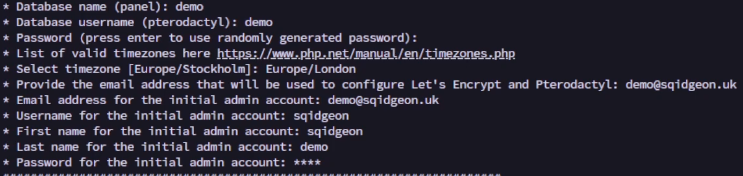
Configuration
| Parameter | Usage | Recommended Value |
|---|---|---|
| Database name | The database name | (Leave Empty) |
| Database username | The database username | (Leave Empty) |
| Password | The database password | (Leave Empty) |
| Timezone | The timezone the panel will use | (Your timezone) |
| Panel email | The email the panel will use | (Put your email) |
| The email for the first admin | (Put your email) | |
| Username | The username for the first admin | (Put your username) |
| First Names | The first name for the first admin | (Put your first name) |
| Last name | The last name for the first admin | (Put your last name) |
| Password | The password the panel will use | (Put your password) |
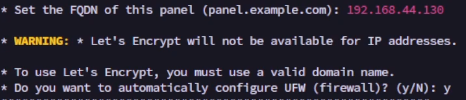
Using an ip address
Type your public ip address in the FQDN parameter and type y for the firewall
Using a domain with Let's Encrypt
Type your domain / subdomain in the FQDN parameter, type y to automatically configure HTTPS using Let's Encrypt and type y for the firewall
